🔥 内容介绍
一、研究背景与主题引入
在自动驾驶技术迅猛发展的当下,自动驾驶赛车作为该领域的前沿应用,对路径规划算法提出了极高要求。赛车运动具有高速、动态、竞争激烈等特点,要求路径规划算法不仅能快速响应复杂多变的赛道环境,还要在保证安全的前提下,实现最优的行驶路径规划,以提升赛车在比赛中的竞争力。
快速探索随机树(RRT)算法作为一种基于采样的路径规划算法,凭借其快速探索高维空间、概率完备性等优势,在机器人路径规划、自动驾驶等领域展现出巨大潜力。然而,在自动驾驶赛车这一特定场景下,RRT算法面临着诸多挑战,如如何提高路径规划的实时性、优化路径质量以适应高速行驶需求等。因此,深入研究自动驾驶赛车基于RRT的路径规划具有重要的理论意义和实际应用价值。
二、理论基础与文献综述
2.1 RRT算法基本原理
RRT算法由LaValle于1998年提出,其核心思想是在状态空间中通过随机采样构建一棵树状结构。算法从起始点开始,随机生成采样点,找到树中距离该采样点最近的节点,并从该节点向采样点方向扩展一定步长生成新节点。若新节点与最近节点之间的路径无碰撞,则将新节点加入树中。重复此过程,直到树覆盖目标位置或达到预设迭代次数,最后通过树结构回溯形成路径。
2.2 相关研究成果
前人在RRT算法及其改进方面开展了大量研究。在算法改进方面,RRT算法通过引入“重布线”机制,在构建树过程中不断优化路径,实现渐进最优路径规划;Informed RRT算法利用启发式信息缩小搜索空间,提高搜索效率;RRT-Connect算法采用双向搜索策略,从起点和目标点同时扩展两棵树,加快路径生成速度。在应用研究方面,RRT算法已广泛应用于机器人导航、无人机路径规划等领域,在自动驾驶领域也有一定研究,但针对自动驾驶赛车这一特定场景的研究相对较少。
2.3 研究缺口与问题
当前研究中,针对自动驾驶赛车场景的RRT算法研究存在以下缺口:一是现有算法在实时性方面难以满足赛车高速行驶的需求,尤其是在复杂赛道环境下,算法计算时间过长可能导致赛车无法及时做出决策;二是路径质量有待提高,原始RRT算法生成的路径通常不够平滑,存在较多折点,影响赛车行驶的稳定性和速度;三是缺乏对赛车动力学约束的充分考虑,导致规划出的路径在实际行驶中可能无法实现。
⛳️ 运行结果
📣 部分代码
ose, nextGoal);
% Check if the path is valid. If the planner fails to compute a path,
% or the path is not collision-free because of updates to the map, the
% system needs to re-plan. This scenario uses a static map, so the path
% will always be collision-free.
isReplanNeeded = ~checkPathValidity(refPath, costmap);
if isReplanNeeded
warning('Unable to find a valid path. Attempting to re-plan.')
% Request behavioral planner to re-plan
replanNeeded(BehavioralPlanner);
continue;
end
% Retrieve transition poses and directions from the planned path
[transitionPoses, directions] = interpolate(refPath);
% Smooth the path
numSmoothPoses = round(refPath.Length / approxSeparation);
[refPoses, directions, cumLengths, curvatures] = smoothPathSpline(transitionPoses, directions, numSmoothPoses);
% Generate a velocity profile
refVelocities = helperGenerateVelocityProfile(directions, cumLengths, curvatures, startSpeed, endSpeed, maxSpeed);
% Configure path analyzer
pathAnalyzer.RefPoses = refPoses;
pathAnalyzer.Directions = directions;
pathAnalyzer.VelocityProfile = refVelocities;
% Reset longitudinal controller
reset(lonController);
reachGoal = false;
% Execute control loop
while ~reachGoal
% Find the reference pose on the path and the corresponding velocity
[refPose, refVel, direction] = pathAnalyzer(currentPose, currentVel);
% Update driving direction for the simulator
updateDrivingDirection(vehicleSim, direction);
% Compute steering command
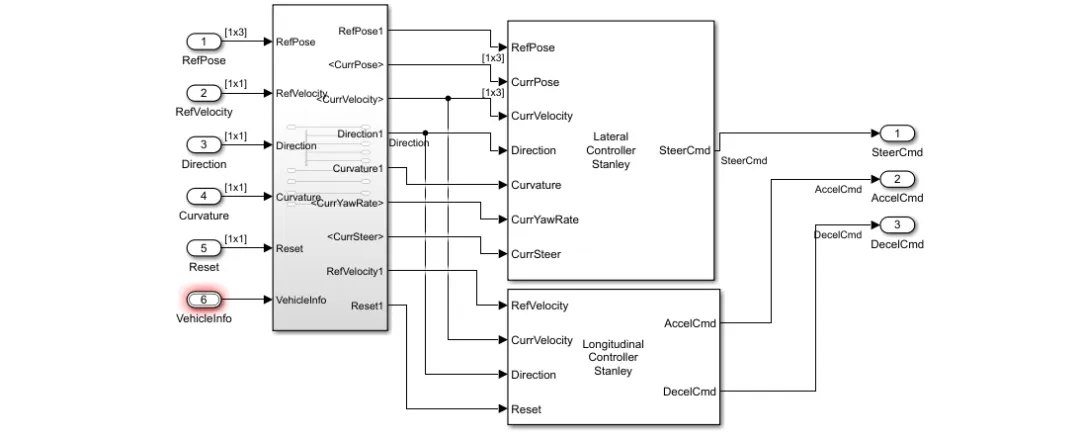
steeringAngle = lateralControllerStanley(refPose, currentPose, currentVel, ...
'Direction', direction, 'Wheelbase', vehicleDims.Wheelbase);
% Compute acceleration and deceleration commands
lonController.Direction = direction;
[accelCmd, decelCmd] = lonController(refVel, currentVel);
% Simulate the vehicle using the controller outputs
drive(vehicleSim, accelCmd, decelCmd, steeringAngle);
% Check if the vehicle reaches the goal
reachGoal = helperGoalChecker(nextGoal, currentPose, currentVel, speedConfig.EndSpeed, direction);
% Wait for fixed-rate execution
waitfor(controlRate);
% Get current pose and velocity of the vehicle
currentPose = getVehiclePose(vehicleSim);
currentVel = getVehicleVelocity(vehicleSim);
end
end
% Show vehicle simulation figure
showFigure(vehicleSim);
%load('helperSLCreateUtilityBus.mat');
open_system('Handlingmodel');
set_param('Handlingmodel','SimulationCommand','Update');
open_system('Handlingmodel/Vehicle Controller')
open_system('Handlingmodel/Vehicle Model');
sim('Handlingmodel')
🔗 参考文献









 10个月宝宝每天需要喝多少奶粉?